Transactions
PennyWallet has three transaction types. Each is designed for a specific real-world scenario.
Transaction Types
Expense
Money leaving one of your accounts for a purchase or payment.
| Field | Required | Notes |
|---|---|---|
| Account | Yes | The account the money came from |
| Category | No | e.g. Food, Transport, Shopping |
| Note | No | Free-text description |
| Amount | Yes | Positive number |
Effect on balance:
- Cash / Bank account → balance decreases
- Credit Card → outstanding debt increases
- Refund toggle → amount is stored as a negative expense; credit card debt or cash/bank spending is reduced
Example: Paid NT$280 for lunch with cash → Account: Cash, Category: Food, Amount: 280
Example: Returned a NT$320 purchase on Visa Platinum → Account: Visa Platinum, Category: Shopping, Amount: 320, Refund enabled
Income
Money arriving into one of your cash or bank accounts. Credit card accounts are excluded from the income account selector.
| Field | Required | Notes |
|---|---|---|
| Account | Yes | The account receiving the money |
| Category | No | e.g. Salary, Bonus, Side Income |
| Note | No | Free-text description |
| Amount | Yes | Positive number |
Effect on balance:
- Any account type → balance increases
Example: Monthly salary deposited into HSBC → Account: HSBC Savings, Category: Salary, Amount: 72000
Transfer
Moving money between two of your own accounts — including credit card payments and investment trades.
| Field | Required | Notes |
|---|---|---|
| Category | Yes | e.g. Account Transfer, Credit Card Payment |
| From Account | Yes | Source account |
| To Account | Yes | Destination account |
| Note | No | Free-text description |
| Amount | Yes | Positive number |
Transfer categories and their account rules:
| Category | From Account | To Account |
|---|---|---|
| Account Transfer | Any non-credit-card | Any non-credit-card |
| Credit Card Payment | Cash or Bank | Credit Card |
| Investment Trade | Any | Any |
Effect on balance:
- Account Transfer / Investment Trade: From decreases, To increases
- Credit Card Payment: From (bank) decreases, To (credit card) debt decreases
Example: Withdraw NT$8,000 cash from ATM → Category: Account Transfer, From: HSBC Savings, To: Cash, Amount: 8000
Example: Pay NT$5,200 credit card bill from savings → Category: Credit Card Payment, From: HSBC Savings, To: Visa Platinum, Amount: 5200
See Credit Card Workflow for the full credit card cycle.
Adding a Transaction
From Finance Overview or Transactions view: click + Add Transaction
From the Command Palette: run PennyWallet: Add Transaction
From the ribbon icon: click the balloon icon → then + Add Transaction
From iOS Shortcuts: see URI Handler & iOS Shortcuts
Mobile entry
On phones (body.is-phone), the transaction form switches to a touch-friendly layout:
- Amount opens a calculator sheet — numpad,
00, ⌫, and a formula bar in the sheet title. Press Done to commit the computed value back into the field. - Wallet, Category, and Tag fields open as bottom-sheet pickers with search; tags and categories can be created inline from the picker.
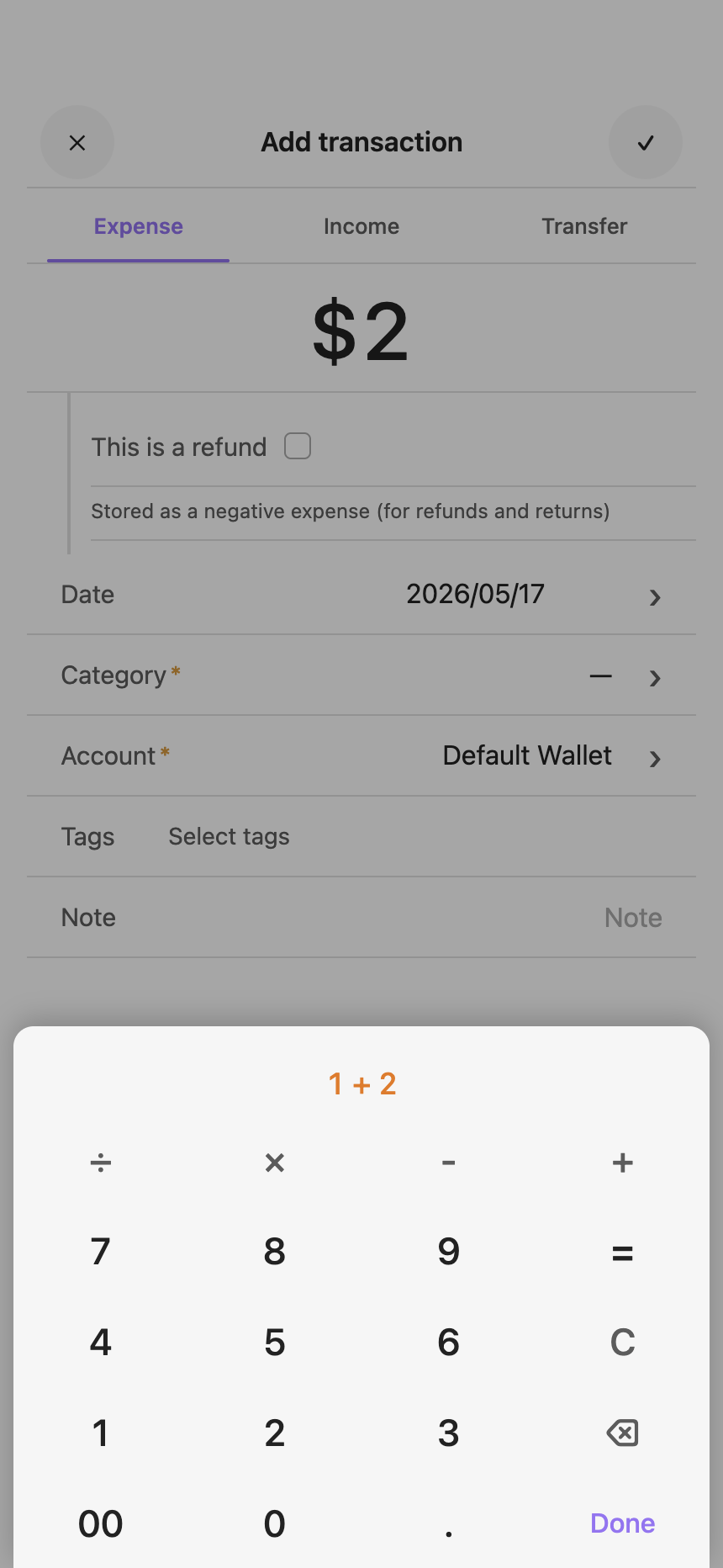
Editing and Deleting
Open the Transactions view, find the entry, and click the edit (✏) icon on the right side of the row. Delete lives inside the edit modal — open the entry to edit, then use the delete action (a confirmation dialog appears before deletion).
Editing supports changing the date (including moving the transaction to a different month), the type, account, category, note, and amount.
Default Categories
Expense
Food · Clothing · Home · Transport · Education · Entertainment · Shopping · Medical · Cash Expense · Insurance · Fees · Tax
Income
Salary · Interest · Side Income · Bonus · Lottery · Rent · Cashback · Dividend · Investment Profit · Insurance Claim · Pension
Transfer
Account Transfer · Credit Card Payment · Investment Trade
Refunds are no longer a transfer category. Use Expense with the refund toggle instead.
If a transaction has no category, it is shown as Uncategorized. This is a display-only label — nothing is stored.
Custom categories can be added in Settings → PennyWallet → Custom Categories.